
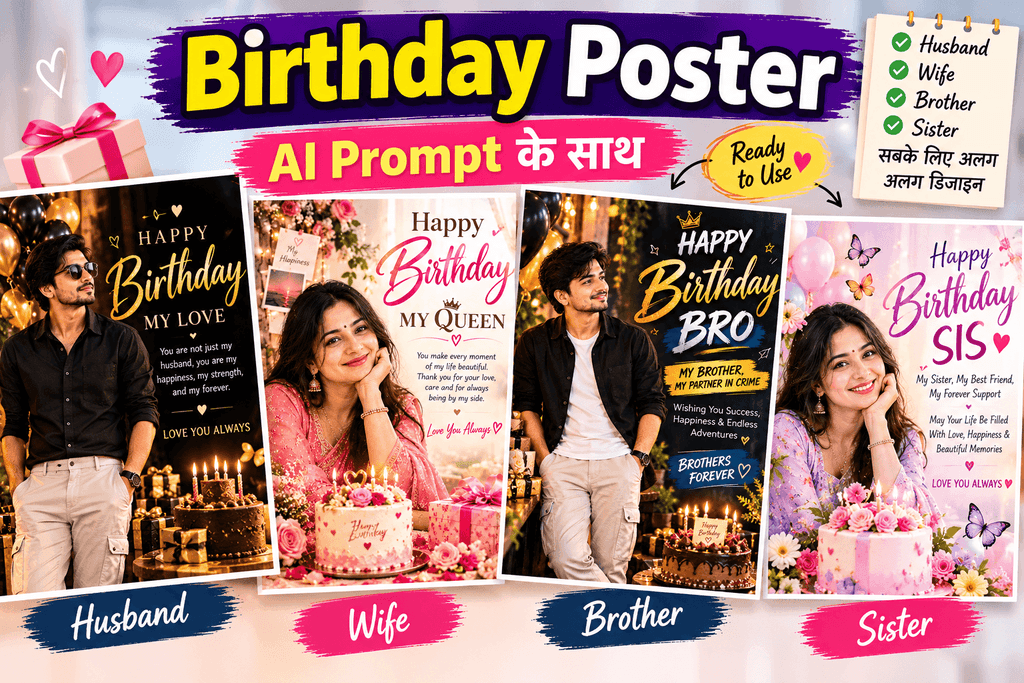
Birthday Poster के लिए AI Prompt: नाम और फोटो के साथ बनाएं

किसी के Birthday पर सुंदर poster बनाना चाहते हैं, लेकिन आपको graphic design करना नहीं आता? अब AI tools की मदद से birthday poster का design तैयार करने की कोशिश कर सकते हैं। इसके लिए आपको केवल एक अच्छा prompt लिखना होगा और अपनी जरूरत के अनुसार नाम, उम्र, रंग और style जैसी जानकारी देनी होगी।
इस पोस्ट में आपको बच्चों, दोस्तों, माता-पिता और business customers के लिए 8 birthday poster ke liye AI prompts मिलेंगे। साथ ही, आप जानेंगे कि Gemini और ChatGPT में इन prompts का इस्तेमाल कैसे करें और poster बनाते समय किन बातों का ध्यान रखें।
Contents
अच्छा Birthday Poster Prompt कैसे लिखें?
एक अच्छा birthday poster prompt AI tool को यह समझाने में मदद करता है कि आपको किस तरह का design चाहिए। केवल “Birthday poster बनाओ” लिखने के बजाय poster की जरूरी जानकारी स्पष्ट रूप से बताएं।
| जरूरी चीज | Prompt में क्या लिखें |
|---|---|
| विषय (Subject) | बच्चे, दोस्त, माता-पिता या ग्राहक का birthday |
| Style | Cute, realistic, 3D, traditional या minimal |
| नाम और Text | नाम, उम्र और birthday wish |
| रंग (Color) | Pink, blue, golden, purple या पसंद का रंग |
| Poster का आकार | Instagram Story 9:16, square 1:1 या landscape 16:9 |
ध्यान दें: AI से poster बनवाते समय नाम और दूसरे text की spelling गलत हो सकती है। इसलिए जरूरी text को ध्यान से जाँचें। जरूरत पड़ने पर Canva जैसे design tool में text अलग से जोड़ सकते हैं।
Ready-to-Use Birthday Poster Prompts
नीचे दिए गए prompts English में हैं, ताकि आप इन्हें सीधे अपने पसंदीदा image generation tool में इस्तेमाल कर सकें।
हर prompt में square brackets के अंदर दी गई जानकारी को अपनी जरूरत के अनुसार बदलें। उदाहरण के लिए, [NAME] की जगह व्यक्ति का नाम और [AGE] की जगह उसकी उम्र लिखें।
Prompt का उपयोग कैसे करें:
- जिसका जन्मदिन है उसका फोटो Gemini या ChatGPT में upload करें।
- नीचे दिया गया prompt copy करके पेस्ट करें।
- जरूरत पड़ने पर Prompt में Name, Age डालें
- तैयार poster में चेहरे की समानता और सभी text की spelling जाँचें।
बच्चे के लिए Cute Birthday Poster Prompt
यह prompt बच्चों के birthday के लिए रंगीन और प्यारा poster बनाने के लिए उपयोगी है। बच्चे का नाम, और उम्र बदलकर इसे इस्तेमाल करें।
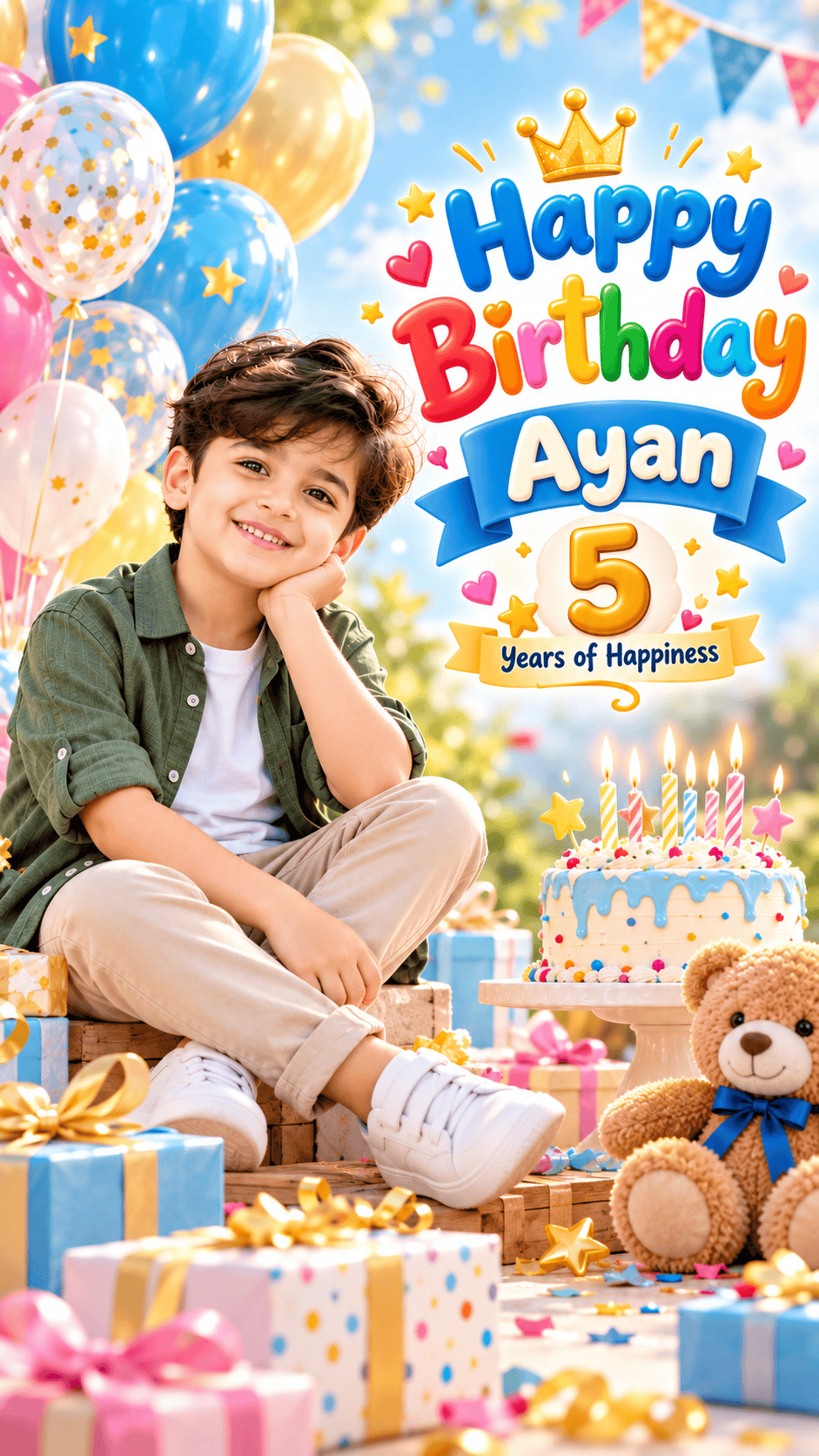
Create a super cute, premium-quality birthday poster using the uploaded child’s photo as the main reference. PHOTO IDENTITY: Preserve the child’s recognizable facial features, natural skin tone, hairstyle, and overall appearance. Do not change the child’s identity. POSTER DESIGN: Create a vertical 9:16 birthday poster in high resolution. Place the child prominently on the left side in a cute, natural sitting pose. Keep the child’s outfit stylish and age-appropriate. Add colorful balloons, wrapped birthday gifts, a cute teddy bear, confetti, small stars, and a beautiful birthday cake with glowing candles. Use a dreamy sky-blue and pastel background with soft lighting and a professional photography look. Add large, attractive, playful typography on the right side.
Display the exact text: “Happy Birthday [NAME]“. Add “[AGE] Years of Happiness” below the main heading, if an age is provided.
Use colorful, clean, readable lettering with small decorative hearts, stars, and a cute crown illustration. Maintain a balanced composition, realistic facial details, vibrant colors, and a premium kids’ birthday photoshoot aesthetic. IMPORTANT: Keep the uploaded child’s face recognizable. Do not add extra people. Avoid distorted hands, duplicate objects, misspelled text, watermarks, logos, and unnecessary text. Make the final image look like a professionally designed, personalized birthday poster.
दोस्त के लिए Instagram Story Birthday Poster
दोस्त को WhatsApp या Instagram पर birthday wish भेजने के लिए इस design का इस्तेमाल करें। नाम और रंग अपनी पसंद से बदलें।
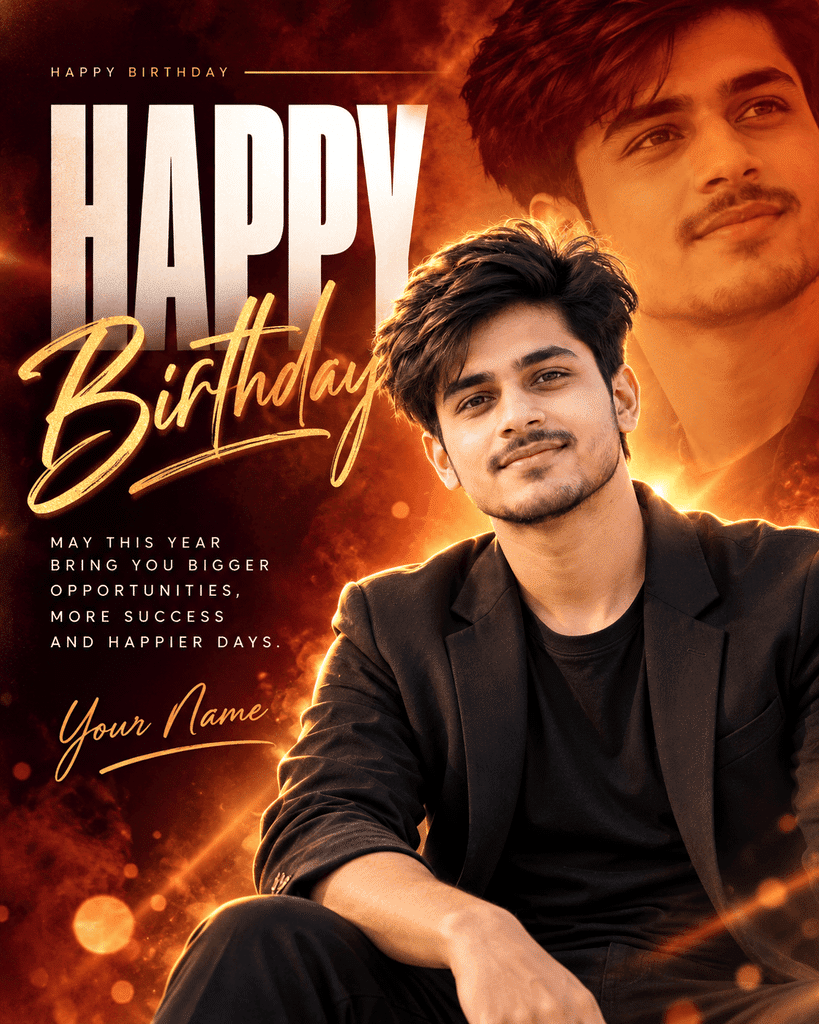
Create a premium cinematic birthday poster using the uploaded photo of an Indian 22-year-old young man as the main subject. Preserve his exact facial identity, natural skin tone, hairstyle, facial features, and realistic appearance.
Poster Size: Vertical 4:5 ratio, high resolution, professional graphic design.
Main Design: Create a stylish birthday poster with a rich dark burgundy, deep maroon, and glowing burnt-orange gradient background. Add dramatic golden rim lighting, cinematic lens flares, subtle smoke, soft bokeh particles, and elegant light streaks.
Photo Composition: Place the main portrait of the young man prominently on the right side, wearing a stylish charcoal-black blazer over a plain black T-shirt. Give him a natural, confident expression, looking slightly upward. Add a second larger, semi-transparent portrait of the same person in the upper-right background, blended smoothly with a warm monochromatic orange tint. Make both portraits realistic and consistent with the uploaded photo.
Typography: On the left side, add oversized bold condensed white uppercase text reading “HAPPY”. Overlap it with elegant golden handwritten brush-script typography reading “Birthday”. Ensure both words are clearly readable, beautifully arranged, and professionally aligned.
Additional Text: Add a small uppercase heading at the top reading “HAPPY BIRTHDAY”, with a thin golden line beside it. Below the main title, add this message in small, clean white uppercase letters:
“MAY THIS YEAR
BRING YOU BIGGER
OPPORTUNITIES,
MORE SUCCESS
AND HAPPIER DAYS.”
At the bottom-left, add the signature text “Your Name” in elegant golden cursive lettering with a thin underline.
Design Style: Premium celebrity birthday poster, modern Indian birthday photography, cinematic color grading, sophisticated typography, dramatic contrast, realistic skin texture, professional Photoshop-style compositing, balanced layout, sharp facial details, and luxury editorial aesthetics.
Keep the background uncluttered. Make the main portrait and birthday typography the visual focus. Ensure all text is correctly spelled, readable, and free from unwanted extra text, logos, watermarks, or borders. Do not alter the person’s identity or create an artificial-looking face.
Birthday Poster for Mother – AI Prompt
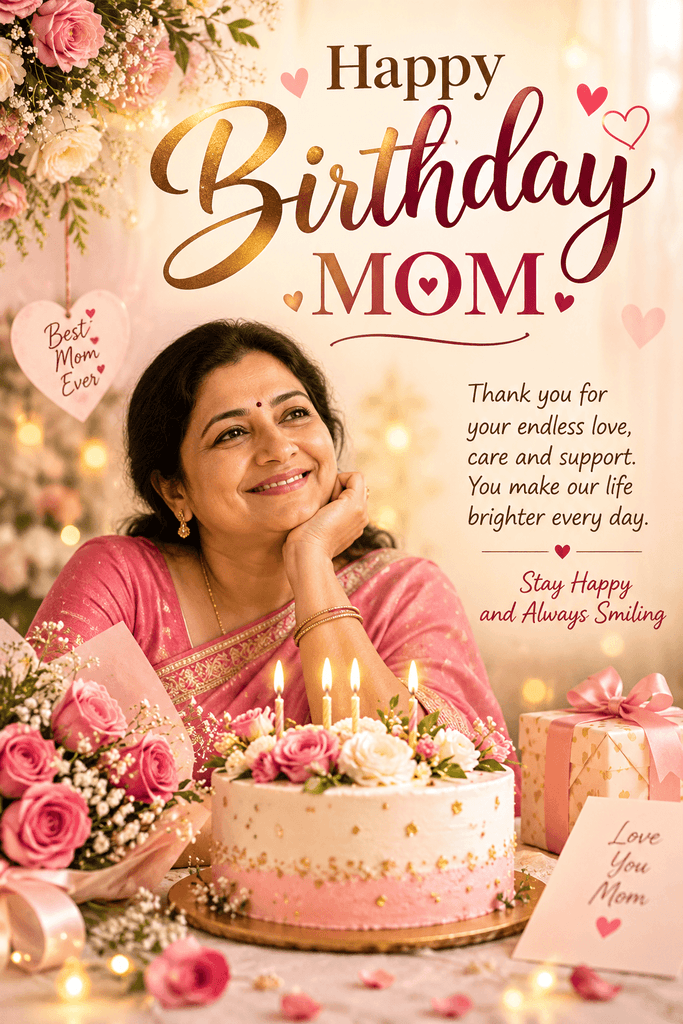
Create a premium, elegant birthday poster using the uploaded photo of my mother as the main subject in a vertical 4:5 composition. Preserve her exact facial identity, facial features, hairstyle, natural skin tone, and realistic appearance; do not replace her face or make her look like another person, and if possible keep her original outfit unchanged.
Design a warm, emotional greeting card using cream, blush pink, and gold colors, with soft cinematic lighting, delicate roses, subtle hearts, a beautiful birthday cake with glowing candles, a floral bouquet, and an elegant wrapped gift; place my mother prominently on the left and arrange refined, clearly readable typography on the right with the exact text “Happy Birthday MOM”, “Thank you for your endless love, care and support. You make our life brighter every day.”, “Stay Happy and Always Smiling”, and “Love You Mom”, maintaining a balanced layout, realistic details, soft bokeh lights, natural skin texture, and a premium finish without clutter or extra text.
Birthday Poster for Father – AI Prompt
इस prompt में अपनी या अपने पापा की फोटो upload करके इस्तेमाल कर सकते हो।
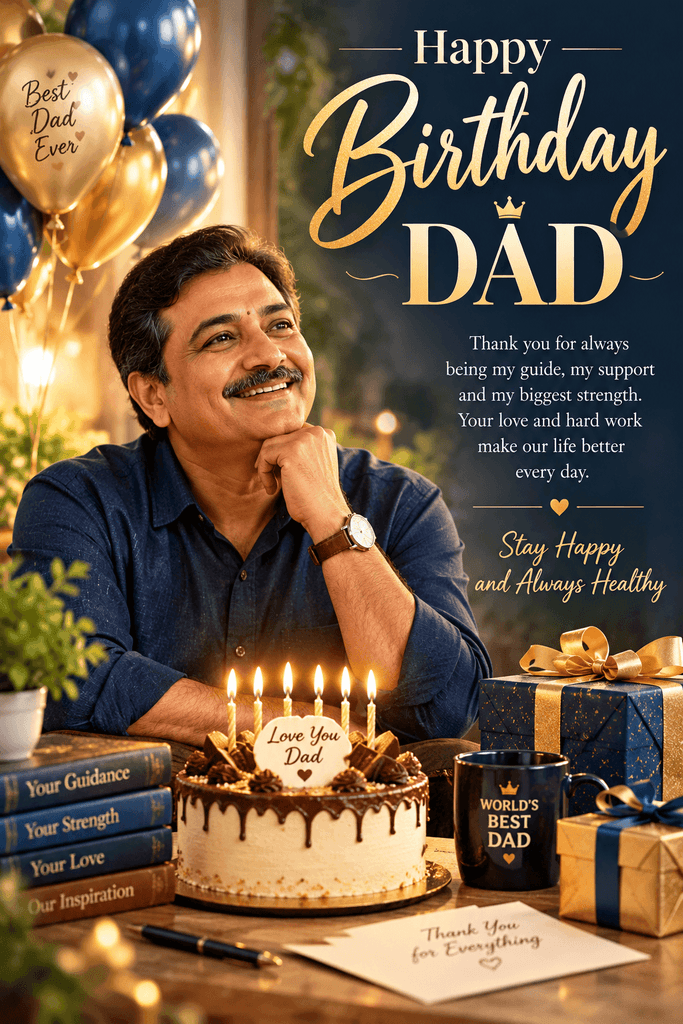
Create a premium, cinematic birthday poster using the uploaded photo of my father as the main subject. Preserve his exact facial identity, facial features, hairstyle, natural skin tone, and realistic appearance. Do not change his face or make him look like another person. Place him prominently on the left side, wearing his original clothes or a classy navy-blue shirt if outfit editing is needed. Use a luxurious navy-blue and golden theme with elegant balloons, warm cinematic lighting, soft bokeh, a beautifully decorated birthday cake with glowing candles, golden gift boxes, and subtle decorative elements.
On the right side, add elegant gold and cream typography with the exact text:
“Happy Birthday DAD”
“Thank you for always being my guide, my support and my biggest strength.”
“Stay Happy and Always Healthy”
“Love You Dad”Create a realistic, professional birthday greeting poster with balanced composition, sharp details, natural skin texture, readable text, and premium graphic design. Vertical 4:5 ratio, high resolution. Keep the uploaded person’s identity unchanged and avoid unnecessary decorations or extra text.
Husband Birthday Poster – Photo Prompt
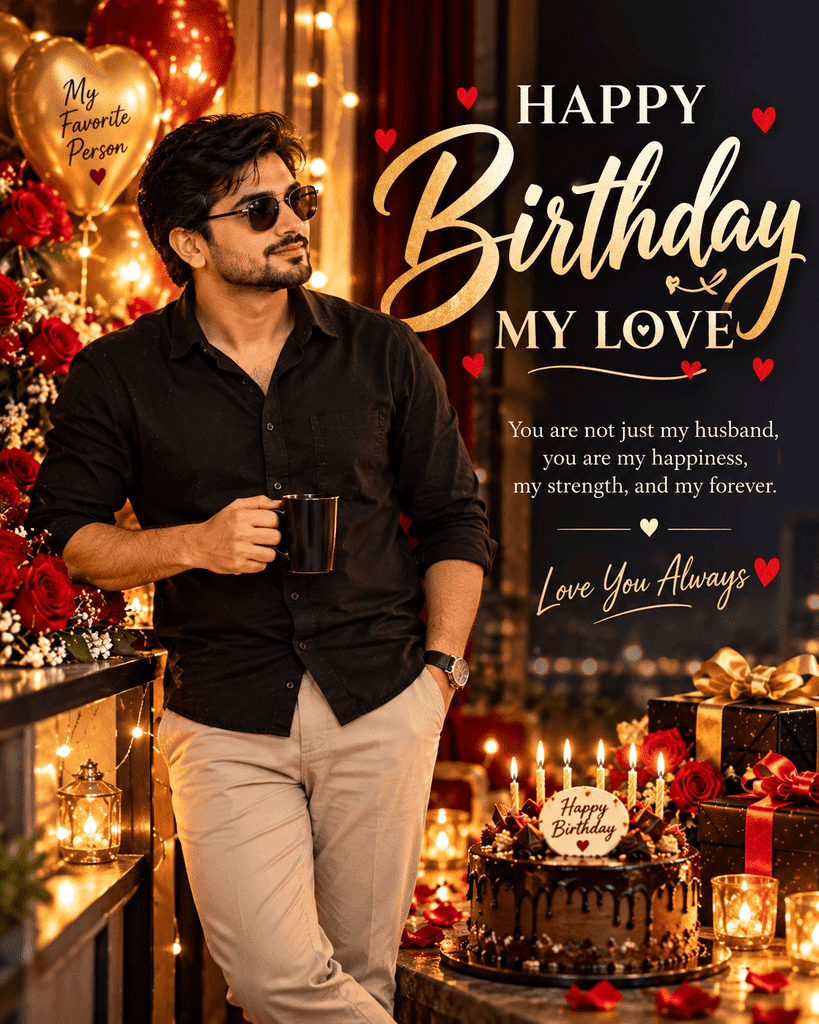
Create a stylish, premium birthday poster using the uploaded photo of my husband as the main subject in a vertical 4:5 composition. Preserve his exact facial identity, facial features, hairstyle, natural skin tone, and realistic appearance; do not replace his face or make him look like another person.
Show him standing confidently in a relaxed, stylish pose, wearing a black shirt and elegant trousers, with one hand in his pocket and the other holding a coffee mug or resting naturally by his side. Keep his original outfit if possible. Use a luxurious black, deep burgundy, and golden theme with warm cinematic lighting, glowing fairy lights, red roses, elegant balloons, a chocolate birthday cake with candles, and premium gift boxes.
Place his full standing portrait prominently on the left side and arrange beautiful gold and cream typography on the right with the exact text:
“HAPPY BIRTHDAY MY LOVE”
“You are not just my husband, you are my happiness, my strength, and my forever.”
“LOVE YOU ALWAYS ❤️”Create a modern romantic editorial design with realistic details, rich contrast, soft bokeh, natural body proportions, and balanced spacing. Keep all text readable, avoid extra words and unnecessary decorations, and maintain a premium professional finish. Vertical 4:5 ratio, high resolution.
Wife Birthday Poster – Unique Trending AI Prompt
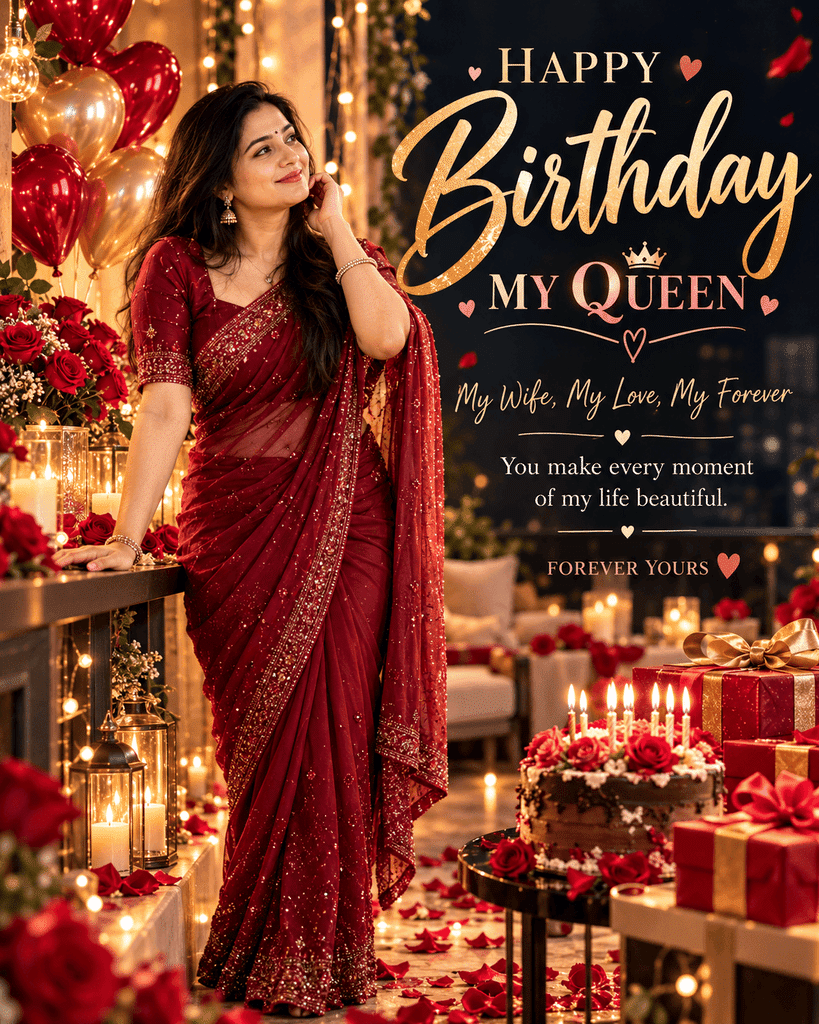
Create a unique, ultra-stylish birthday poster for my wife using her uploaded photo as the main subject, in a vertical 4:5 composition. Preserve her exact facial identity, facial features, hairstyle, natural skin tone, and realistic appearance; do not replace her face or make her look like another person.
Show her standing confidently in an elegant, fashionable pose with a graceful expression, wearing a stylish outfit that complements the design; preserve her original outfit whenever possible. Use a trending luxury editorial aesthetic with a deep burgundy and black background, metallic rose-gold typography, dramatic studio lighting, subtle neon-pink accents, floating rose petals, elegant roses, glowing fairy lights, and a sophisticated birthday cake with candles.
Place her full-length portrait prominently on the left, with large artistic typography on the right reading exactly:
“HAPPY BIRTHDAY MY QUEEN”
“My Wife, My Love, My Forever”
“You make every moment of my life beautiful.”
“FOREVER YOURS ❤️”Add subtle magazine-cover elements, layered depth, cinematic shadows, premium color grading, realistic skin texture, and a polished professional layout. Keep the composition modern, romantic, bold, and uncluttered, with clear text and natural body proportions. Do not add random text, extra people, or unnecessary decorations. High-quality realistic poster, vertical 4:5 ratio.
Brother Birthday Poster – Photo Upload AI Prompt
इस prompt में अपने भाई की फोटो upload करके एक stylish, youthful और premium birthday poster बना सकते हो।
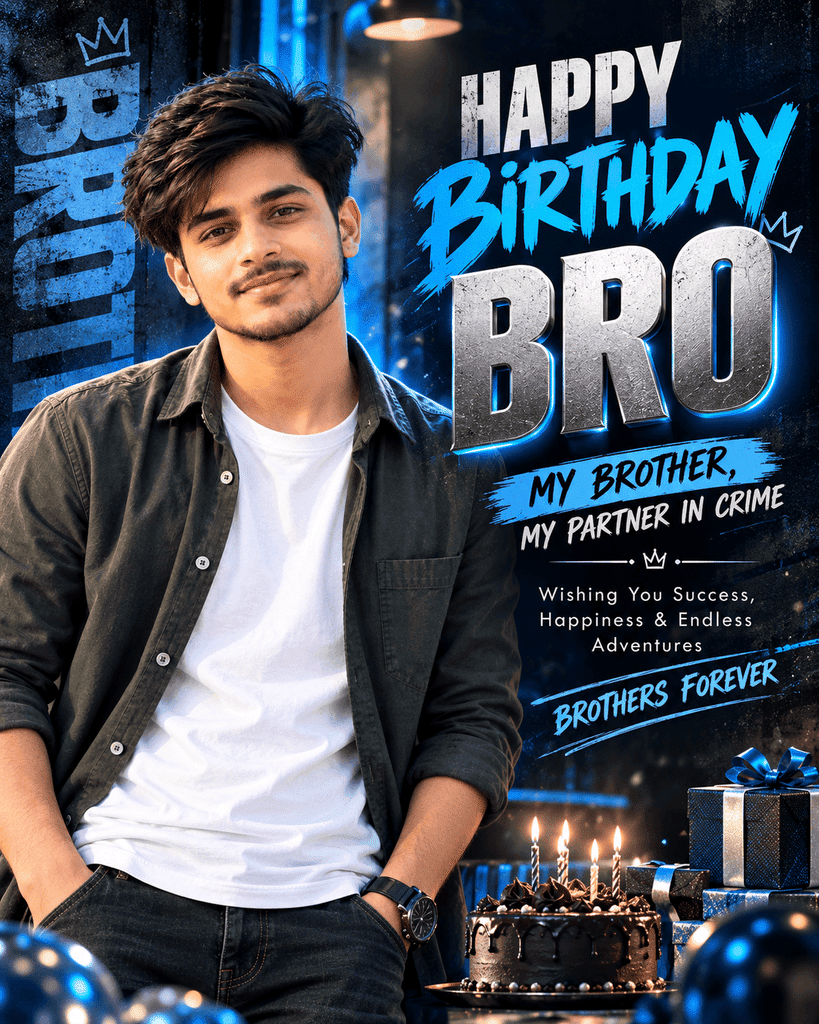
Create a trendy, high-end birthday poster using the uploaded photo of my brother as the main subject in a vertical 4:5 composition. Preserve his exact facial identity, facial features, hairstyle, natural skin tone, and realistic appearance; do not replace his face or make him look like another person.
Show him standing confidently in a relaxed, stylish pose, wearing a modern casual outfit or his original clothes. Use a bold urban editorial design with electric blue, charcoal black, and silver accents, dramatic studio lighting, subtle neon streaks, abstract geometric shapes, floating particles, and a premium 3D birthday number [AGE] if specified. Place his portrait prominently on the left, with bold modern typography on the right.
Add the exact text:
“HAPPY BIRTHDAY BRO”
“MY BROTHER, MY PARTNER IN CRIME”
“Wishing You Success, Happiness & Endless Adventures”
“BROTHERS FOREVER”Use sharp contrast, realistic skin texture, cinematic depth, clean spacing, stylish magazine-cover typography, and a professional social-media poster aesthetic. Keep the face clearly visible from the front, avoid clutter, extra people, distorted hands, and unnecessary text. High-quality realistic design, vertical 4:5 ratio.
कैसे इस्तेमाल करें: भाई की फोटो upload करें, [AGE] को उसकी उम्र से बदलें और prompt paste करें। अगर उम्र नहीं दिखानी है, तो birthday number वाली लाइन हटा दें।
Sister Birthday Poster – Photo AI Prompt
इस prompt से अपनी sister की फोटो लगाकर एक stylish, cute और premium birthday poster बना सकते हो। Design में front-facing face, pastel colors और modern scrapbook aesthetic रखा गया है।
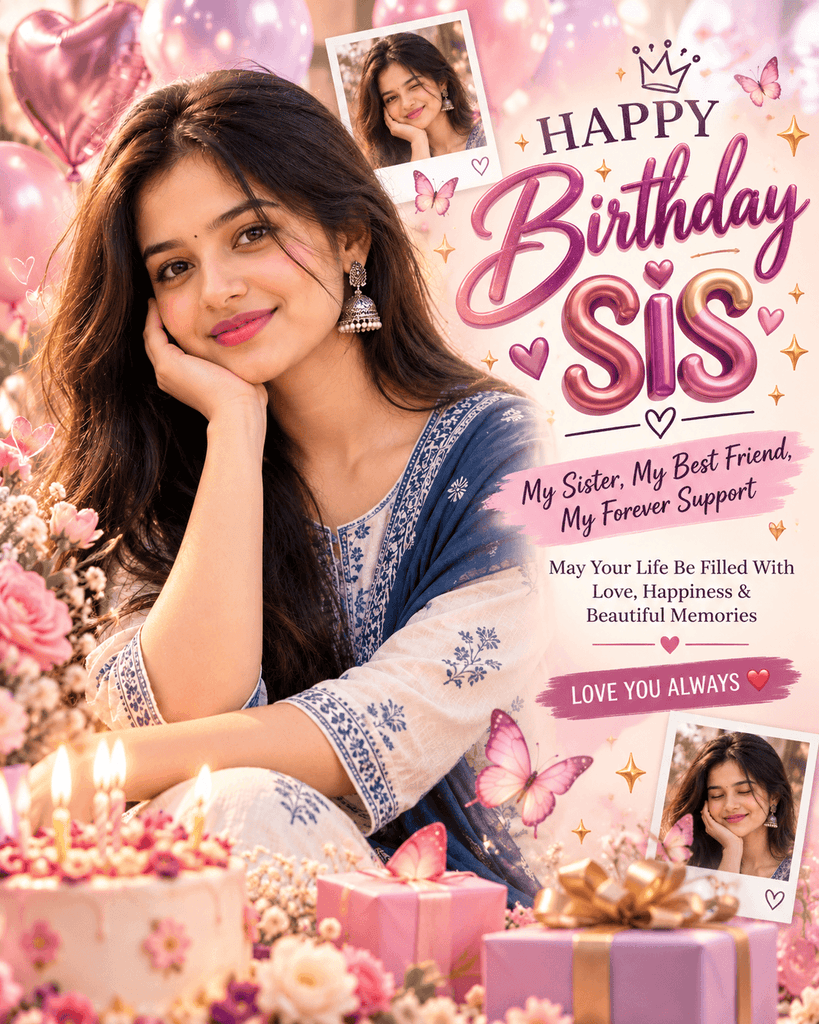
Create a beautiful, trendy birthday poster using the uploaded photo of my sister as the main subject in a vertical 4:5 composition. Preserve her exact facial identity, facial features, hairstyle, natural skin tone, and realistic appearance. Do not replace her face or make her look like another person.
Show her facing the camera with a natural, cheerful smile, wearing her original outfit or a stylish modern outfit that suits the design. Use a dreamy pastel pink, lavender, and cream color palette with soft studio lighting, delicate flowers, butterflies, floating ribbons, glossy balloons, tiny stars, polaroid-style photo frames, and a beautifully decorated birthday cake.
Place her portrait prominently on the left and arrange stylish typography on the right with the exact text:
“HAPPY BIRTHDAY SIS”
“My Sister, My Best Friend, My Forever Support”
“May Your Life Be Filled With Love, Happiness & Beautiful Memories”
“LOVE YOU ALWAYS ❤️”Use a modern scrapbook-meets-editorial design with handwritten accents, elegant lettering, subtle 3D elements, soft bokeh, realistic skin texture, and a clean, balanced composition. Keep her face clearly visible from the front, avoid clutter, extra people, distorted hands, and unnecessary text. Create a high-quality, professional birthday poster in vertical 4:5 format.
इस्तेमाल करने का तरीका:
- अपनी sister की फोटो upload करें।
- Prompt को copy करके AI image tool में paste करें।
- जरूरत के अनुसार
SISकी जगह उसका नाम और पसंद के रंग डालें। - Generate होने के बाद चेहरे और text की spelling जाँचें।
Gemini और ChatGPT में Birthday Poster कैसे बनाएं?
Gemini birthday poster prompt और ChatGPT birthday photo prompt का इस्तेमाल करते समय मुख्य बात यह है कि अपनी जरूरत स्पष्ट लिखें। दोनों में उपलब्ध विकल्प और परिणाम आपके इस्तेमाल किए जा रहे version के अनुसार अलग हो सकते हैं।
Gemini में Birthday Poster बनाने के Steps
Step 1: Gemini खोलें – Gemini के उपलब्ध interface में prompt लिखने की जगह पर जाएं।
Step 2: Prompt कॉपी करें – ऊपर दिए गए birthday poster prompt में [NAME], [AGE] और [COLOR] जैसे placeholders को अपनी जानकारी से बदलें।
Step 3: जरूरत के अनुसार image generate करें – अपने interface में उपलब्ध image generation विकल्पों का उपयोग करें।
Step 4: Poster जाँचें – नाम, उम्र, text, रंग और composition देखें। गलत text होने पर सुधार के लिए नया निर्देश दें या text अलग से जोड़ें।
ChatGPT में Birthday Poster बनाने के Steps
- ChatGPT खोलें और उपलब्ध image generation विकल्प देखें।
- ऊपर दिए गए prompts में से अपनी जरूरत वाला prompt कॉपी करें।
[NAME],[AGE],[COLOR]और दूसरे placeholders बदलें।- Prompt भेजें और उपलब्ध परिणाम की जाँच करें।
अगर poster में किसी व्यक्ति की फोटो शामिल करनी है, तो केवल जरूरी और अनुमति प्राप्त फोटो इस्तेमाल करें। फोटो के साथ निर्देश में बताएं कि चेहरा प्राकृतिक रहे और design का बाकी हिस्सा कैसा हो।
Birthday Poster बनाते समय आम गलतियाँ और उनका हल
- नाम की spelling गलत आना: Prompt में नाम साफ लिखें। फिर भी गलती हो तो text को Canva जैसे editor में अलग से जोड़ें।
- बहुत ज्यादा चीजें डालना: एक मुख्य विषय, सीमित रंग और कुछ जरूरी decorative elements रखें।
- गलत poster size: Instagram Story के लिए 9:16, square post के लिए 1:1 और portrait poster के लिए जरूरत के अनुसार 4:5 चुनें।
- बहुत ज्यादा text: केवल नाम, birthday greeting और जरूरी message रखें।
- चेहरा बदल जाना: Photo-based design में चेहरे की पहचान बनाए रखने का निर्देश दें। परिणाम को मूल फोटो से मिलाकर जाँचें।
- नाम और उम्र का गलत स्थान: Prompt में स्पष्ट बताएं कि नाम center में और उम्र मुख्य text के पास होनी चाहिए।
- कम गुणवत्ता वाला design: जरूरत के अनुसार अधिक स्पष्ट विवरण दें और उपलब्ध परिणामों की तुलना करें।
Photo Upload करने से पहले ध्यान दें
दूसरों की photo उनकी इजाजत के बिना AI tools पर upload न करें। खासकर बच्चों की फोटो और निजी तस्वीरों को साझा करने से पहले अनुमति और privacy का ध्यान रखें।
FAQ: Birthday Poster बनाने से जुड़े सवाल
1. Birthday poster ke liye AI prompts क्या होते हैं?
ये ऐसे लिखित निर्देश होते हैं जिनकी मदद से AI tool को बताया जाता है कि poster में कौन-सा विषय, नाम, रंग, style और layout चाहिए।
2. क्या मोबाइल से birthday poster बनाया जा सकता है?
हां, मोबाइल पर उपलब्ध AI tools और design editors का उपयोग करके poster बनाने की कोशिश कर सकते हैं। प्रक्रिया संबंधित tool और उसके उपलब्ध विकल्पों पर निर्भर करती है।
3. Gemini birthday poster prompt में क्या लिखना चाहिए?
नाम, उम्र, पसंद का रंग, poster style, जरूरी greeting और image का आकार स्पष्ट रूप से लिखें। इससे tool को आपकी जरूरत समझने में मदद मिलती है।
4. ChatGPT birthday photo prompt में अपनी फोटो कैसे इस्तेमाल करें?
यदि आपके interface में image upload और image editing के विकल्प उपलब्ध हैं, तो अनुमति प्राप्त फोटो के साथ निर्देश दें। चेहरे और बाकी design की जाँच जरूर करें।
5. AI से birthday poster kaise banaye और हिंदी में नाम कैसे लिखें?
एक स्पष्ट prompt लिखें, परिणाम तैयार करें और text जाँचें। अगर हिंदी में नाम या greeting गलत आती है, तो किसी design editor में सही text अलग से जोड़ें।
निष्कर्ष
AI की मदद से birthday poster बनाने के लिए graphic design का विशेषज्ञ होना जरूरी नहीं है। एक स्पष्ट prompt, सही नाम, पसंद का रंग और उचित आकार चुनकर शुरुआत की जा सकती है। ऊपर दिए गए prompts को अपनी जरूरत के अनुसार बदलें और इस्तेमाल करने से पहले अंतिम design की जाँच करें।
