
ChatGPT से Birthday Photo कैसे बनाए: Copy-Paste Prompts

अपनी या किसी अपने की photo को birthday style में बदलना आजकल बहुत आसान हो गया है। Cake काटते हुए, गुब्बारों के बीच, कार्टून style में या Instagram story वाले poster की तरह, ये सब आप ChatGPT से सिर्फ एक photo और एक prompt डालकर बनवा सकते हैं।
इस post में आप सीखेंगे कि ChatGPT से Birthday Photo कैसे बनाए, अच्छा prompt कैसे लिखें, और आपको 10+ ready-to-use prompts मिलेंगे जिन्हें आप सीधे copy करके इस्तेमाल कर सकते हैं।
अगर आपको photo की जगह सिर्फ poster या banner बनाना है तो यह post भी देखें: Birthday Poster ke liye AI Prompts
Contents
ChatGPT se Birthday Photo Kaise Banaye (Step by Step)
नीचे के steps mobile और computer दोनों पर लगभग एक जैसे हैं। App के version के हिसाब से buttons के नाम या जगह थोड़ी अलग हो सकती है।
Step 1: ChatGPT खोलें
ChatGPT app खोलें या chatgpt.com पर जाएं और अपने account में login करें।
Step 2: नई chat शुरू करें
पुरानी chat में नहीं, नई chat में काम करें, ताकि पुरानी बातों का असर नतीजे पर न पड़े।
Step 3: अपनी photo attach करें
Message box के पास + या attach (पिन जैसे) icon पर क्लिक करके photo चुनें।
अच्छी photo कैसी हो:
- चेहरा साफ दिखे और सामने से हो
- रोशनी अच्छी हो, photo धुंधली न हो
- एक ही व्यक्ति हो (ग्रुप photo में नतीजा बिगड़ सकता है)
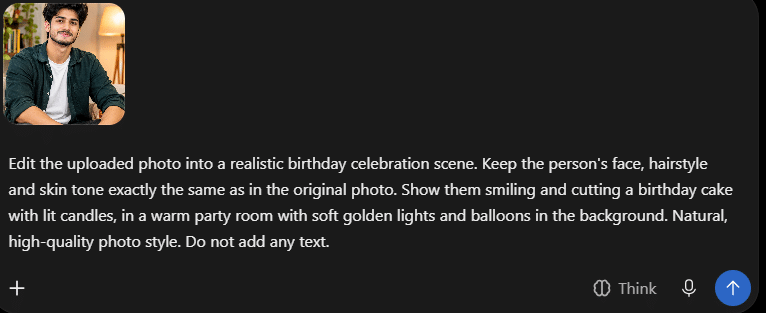
Step 4: Prompt paste करें और बदलाव करें
नीचे दिए prompts में से एक चुनकर paste करें। [NAME], [AGE], [COLOR] जैसी जगहों पर असली नाम, उम्र और रंग लिखें।
Step 5: Send करें और इंतज़ार करें
Image बनने में कुछ समय लगता है। इस दौरान दूसरा message न भेजें।
Step 6: नतीजा देखें और सुधार मांगें
पसंद न आए तो वहीं chat में नया निर्देश लिखें (जैसे “background और bright करो”)। नीचे इसके लिए आसान prompts दिए गए हैं।
Step 7: Photo save करें
नतीजा पसंद आने पर image पर क्लिक करके download या save करें।
Photo के साथ और बिना photo, दो तरीके
| Photo के साथ | बिना photo | |
|---|---|---|
| क्या करें | अपनी photo upload करके birthday style में बदलवाएं | सिर्फ prompt से नई image बनवाएं |
| किसके लिए | Personal wishes, status, story | Greeting card, general wish image |
| चेहरा | आपकी photo से लिया जाता है | कोई असली चेहरा नहीं होता |
| ध्यान रखें | चेहरा हूबहू आए, यह हमेशा पक्का नहीं होता | किसी खास व्यक्ति जैसा नहीं बनेगा |
इस post के ज्यादातर prompts “Photo के साथ” वाले हैं। आखिर में एक “बिना photo” वाला prompt भी है।
अच्छा Birthday Photo Prompt कैसे लिखें
अच्छे नतीजे के लिए prompt में ये 6 चीजें साफ लिखें:
| क्या लिखें | उदाहरण |
|---|---|
| व्यक्ति और चेहरा | “Keep the face unchanged” (चेहरा वैसा ही रखो) |
| Scene / जगह | Cake cutting, party room, studio |
| Style | Realistic photo, cartoon, vintage |
| Background और सजावट | Balloons, confetti, flowers, lights |
| Text | “Happy Birthday [NAME]” (जैसा लिखना है, ठीक वैसा) |
| Format | Vertical 9:16 story या 4:5 post |
एक जरूरी बात: Prompt English में लिखने पर आमतौर पर बेहतर नतीजा मिलता है, इसलिए नीचे के prompts English में हैं और हर एक के साथ हिंदी में बताया गया है कि क्या बदलना है।
10+ Ready Prompts (Copy-Paste)
हर prompt के साथ अपनी photo upload करें। [NAME], [AGE], [COLOR], [DATE] को बदलना न भूलें।
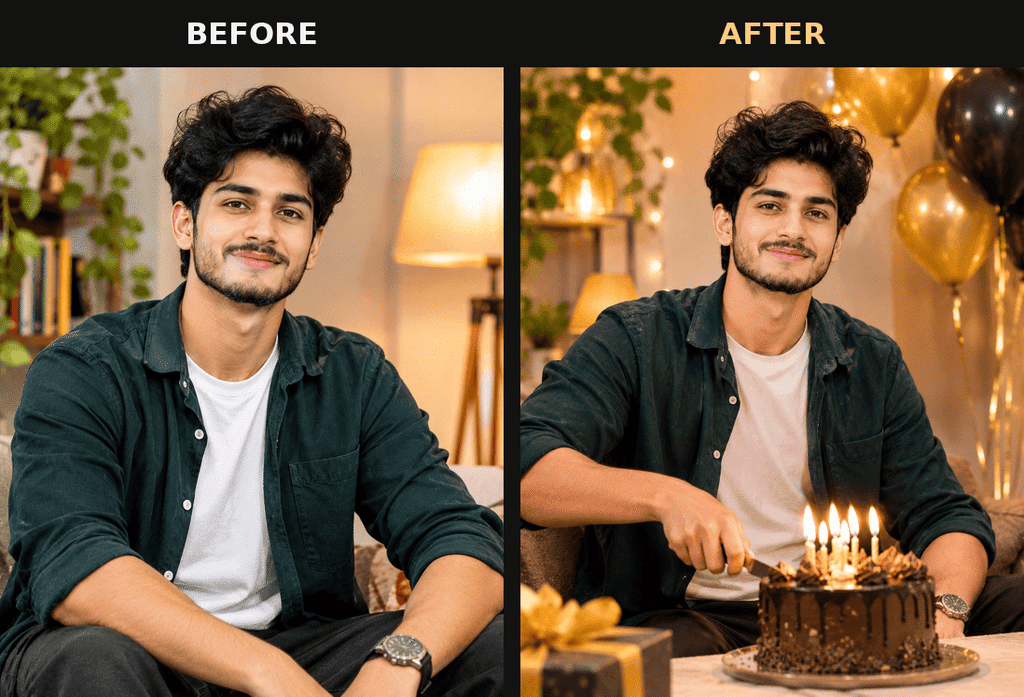
Prompt 1: Cake काटते हुए (सबसे आसान)
Edit the uploaded photo into a realistic birthday celebration scene. Keep the person's face, hairstyle and skin tone exactly the same as in the original photo. Show them smiling and cutting a birthday cake with lit candles, in a warm party room with soft golden lights and balloons in the background. Natural, high-quality photo style. Do not add any text.कब इस्तेमाल करें: जब आपको सबसे natural और सादा नतीजा चाहिए। चाहें तो “Do not add any text” की जगह नाम का text जोड़ें।
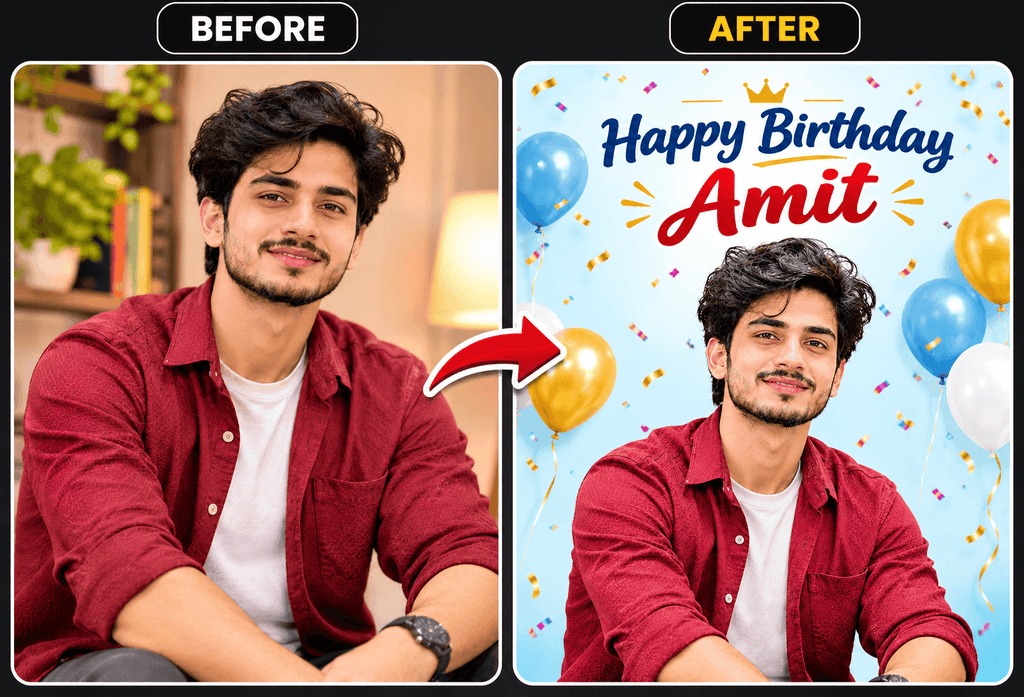
Prompt 2: Balloon और Confetti वाला Portrait
Using the uploaded photo, create a bright birthday portrait. Keep the person's face and features unchanged. Background: a pastel [COLOR] backdrop with floating balloons and falling confetti. Add the text "Happy Birthday [NAME]" in big, clean letters at the top. Vertical 4:5 format, sharp and well lit.क्या बदलें: [COLOR] में pink, blue, yellow जैसा कोई रंग और [NAME] में नाम।
Prompt 3: Cartoon / 3D Style
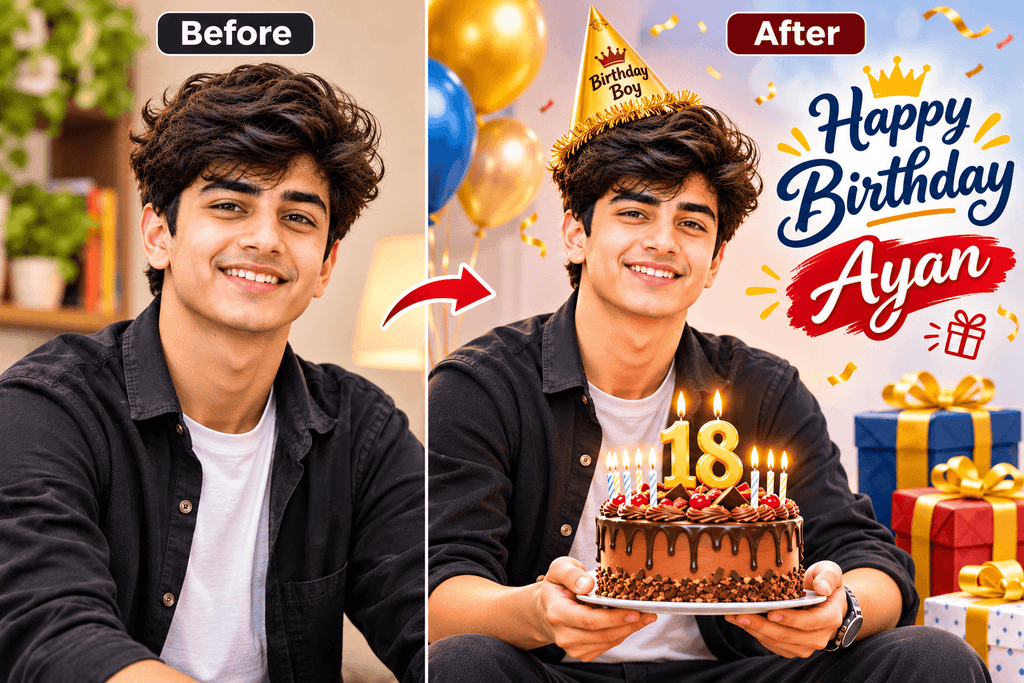
Turn the uploaded photo into a cute 3D animated-style birthday illustration of the same person, keeping their recognizable features. They are holding a cake with [AGE] candles, surrounded by gift boxes and balloons. Bright colors, soft lighting, clean background. Add the text "Happy Birthday [NAME]".कब इस्तेमाल करें: बच्चों या दोस्तों के लिए fun वाले नतीजे के लिए।
Prompt 4: Vintage Film Style
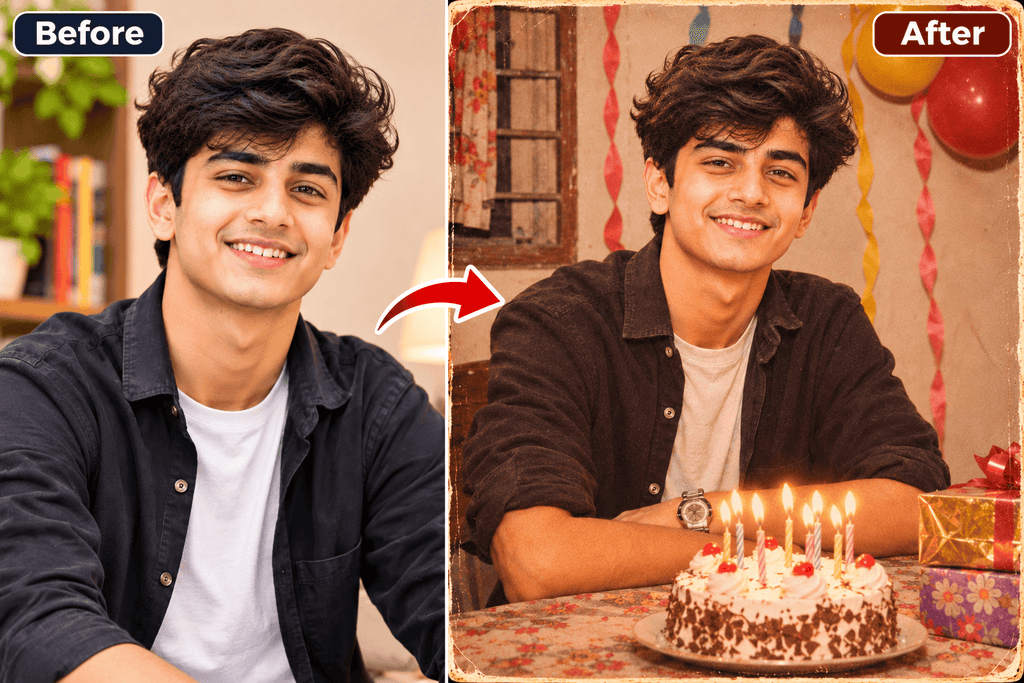
Edit the uploaded photo to look like a vintage film-style birthday photo from the 1990s: warm tones, slight film grain, a simple decorated room with streamers and a cake on the table. Keep the person's face unchanged. Do not add any text.कब इस्तेमाल करें: जब पुरानी यादों वाला, retro look चाहिए।
Prompt 5: Traditional Indian Style
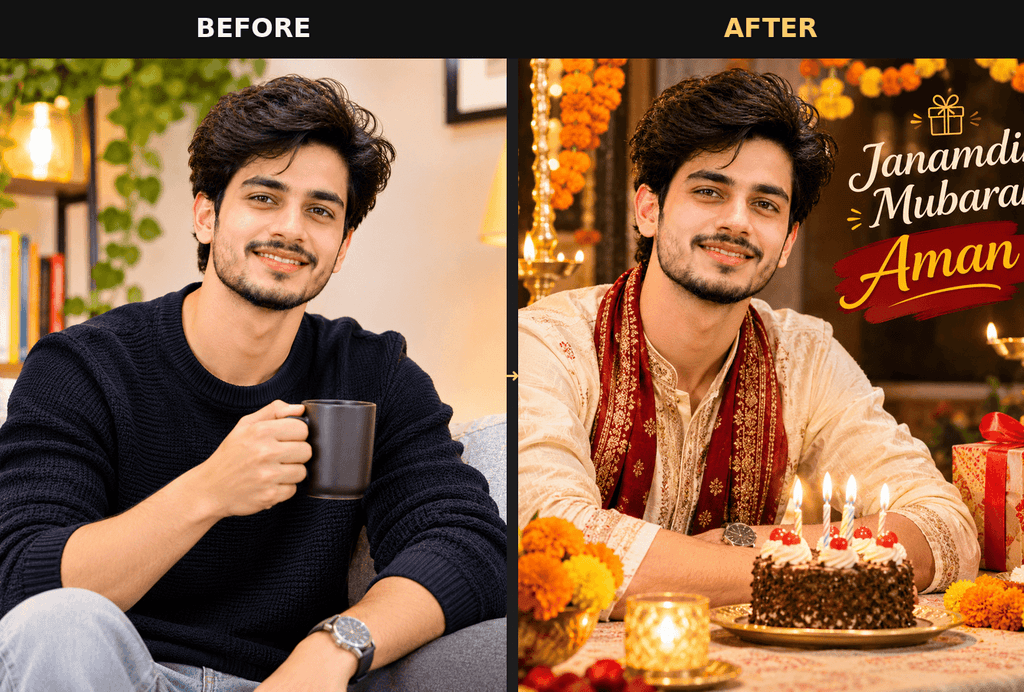
Edit the uploaded photo into a traditional Indian birthday celebration portrait. Keep the person's face unchanged. Background: decorated with marigold flower garlands and diyas, with a small cake on a table, warm festive lighting. Realistic photo style. Add the text "Janamdin Mubarak [NAME]".क्या बदलें: नाम बदलें। चाहें तो “Janamdin Mubarak” की जगह “Happy Birthday” लिखें।
Prompt 6: Neon Text वाला Studio Portrait
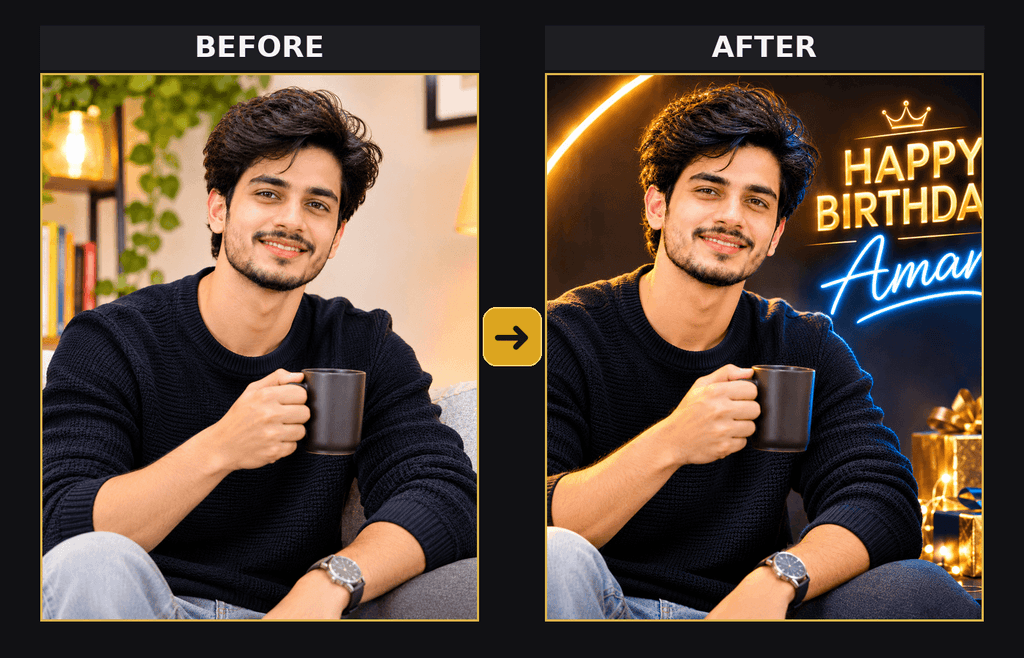
Create a stylish birthday portrait from the uploaded photo: dark studio background with glowing neon text "HAPPY BIRTHDAY [NAME]" behind the person, gold and [COLOR] light reflections, cinematic lighting. Keep the person's face unchanged.कब इस्तेमाल करें: Instagram post या profile photo के लिए, जब stylish look चाहिए।
Prompt 7: Husband / Wife के लिए (Romantic Dinner)
Using the uploaded photo of [NAME], create a romantic birthday dinner scene: a candlelit table with a small cake and one candle, soft warm bokeh lights, an elegant setting. Keep the face unchanged. Add a small text at the bottom: "Happy Birthday [NAME]".क्या बदलें: नाम। चाहें तो text की जगह “Happy Birthday My Love” जैसा कुछ लिखें।
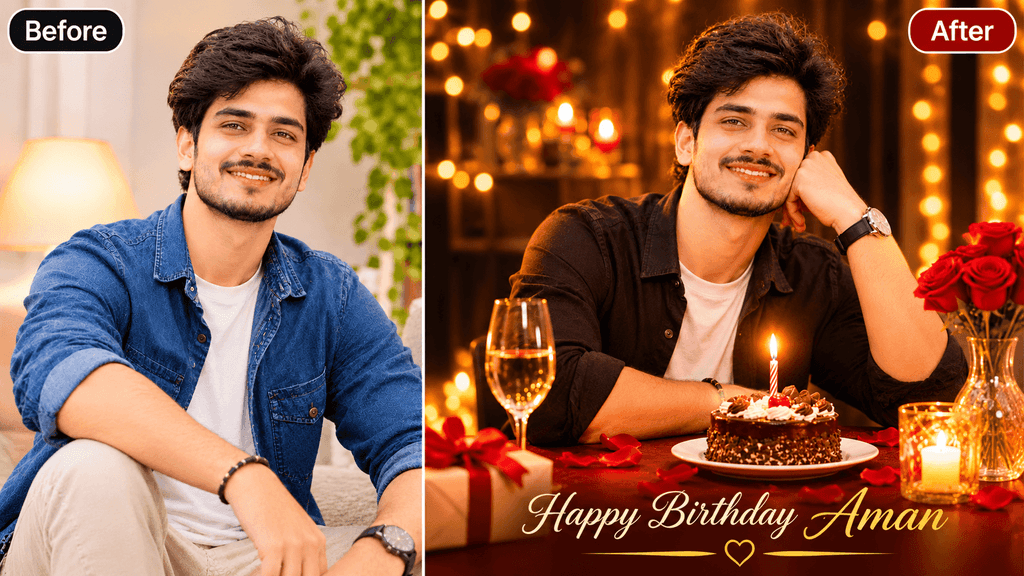
Prompt 8: Mummy / Papa के लिए (Elegant Style)
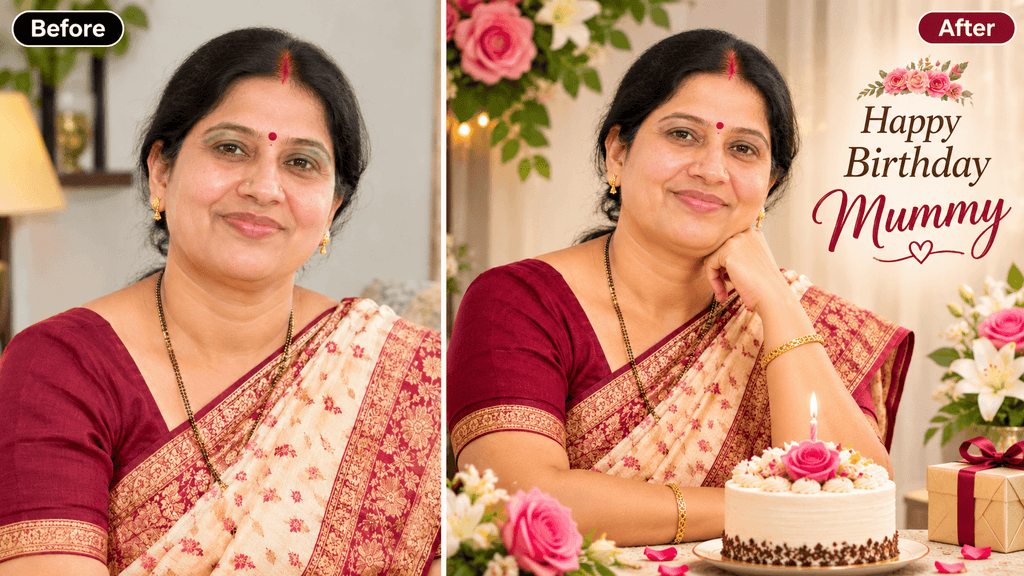
Edit the uploaded photo into an elegant birthday portrait: soft flower decoration with roses and white lilies, a simple cake, gentle natural light, a calm and respectful style. Keep the face and natural age appearance unchanged. Add the text "Happy Birthday Mummy" (or "Happy Birthday Papa").क्या बदलें: Text में Mummy या Papa में से जो चाहिए, वह रखें।
Prompt 9: बच्चे के लिए (Superhero Style)
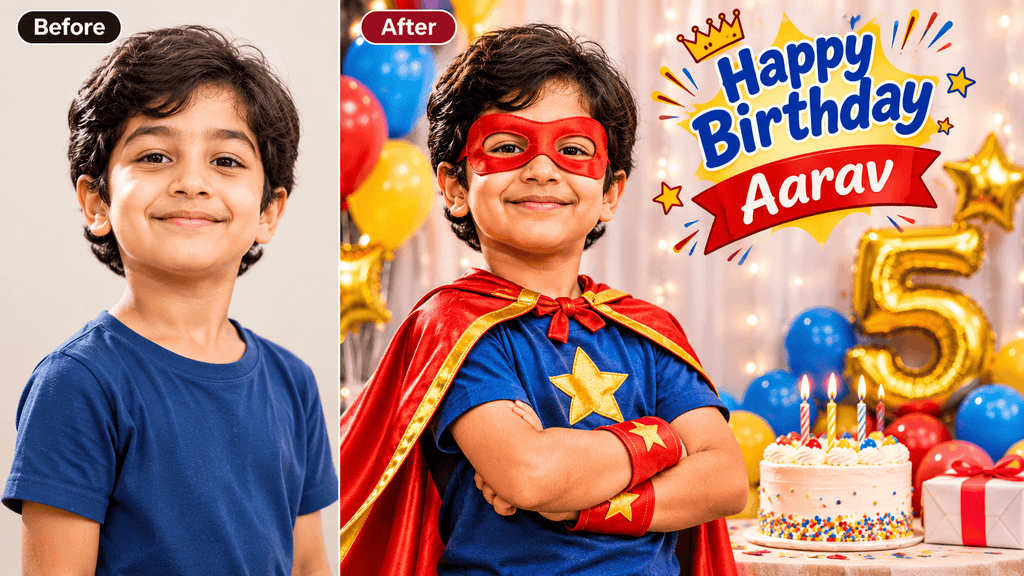
Turn the uploaded photo of a child into a fun birthday poster: the child wears a colorful, generic superhero cape and mask (no brand or movie characters), standing in front of balloons and a big [AGE] number made of balloons. Keep the face recognizable. Add the text "Happy Birthday [NAME]".ध्यान दें: बच्चे की photo सिर्फ उनके माता-पिता की इजाज़त से ही इस्तेमाल करें। नीचे “जरूरी सावधानियाँ” भी पढ़ें।
Prompt 10: Instagram Story के लिए Vertical Poster
Create a vertical 9:16 Instagram story birthday poster using the uploaded photo. Keep the face unchanged. Layout: the person in the center, a big "HAPPY BIRTHDAY" text behind them, the name "[NAME]" in script style below, "[DATE]" in small text at the bottom, a [COLOR] and white color theme, confetti. Clean and modern look.कब इस्तेमाल करें: WhatsApp status और Instagram story के लिए।
Bonus: बिना Photo का Prompt (Greeting Image)
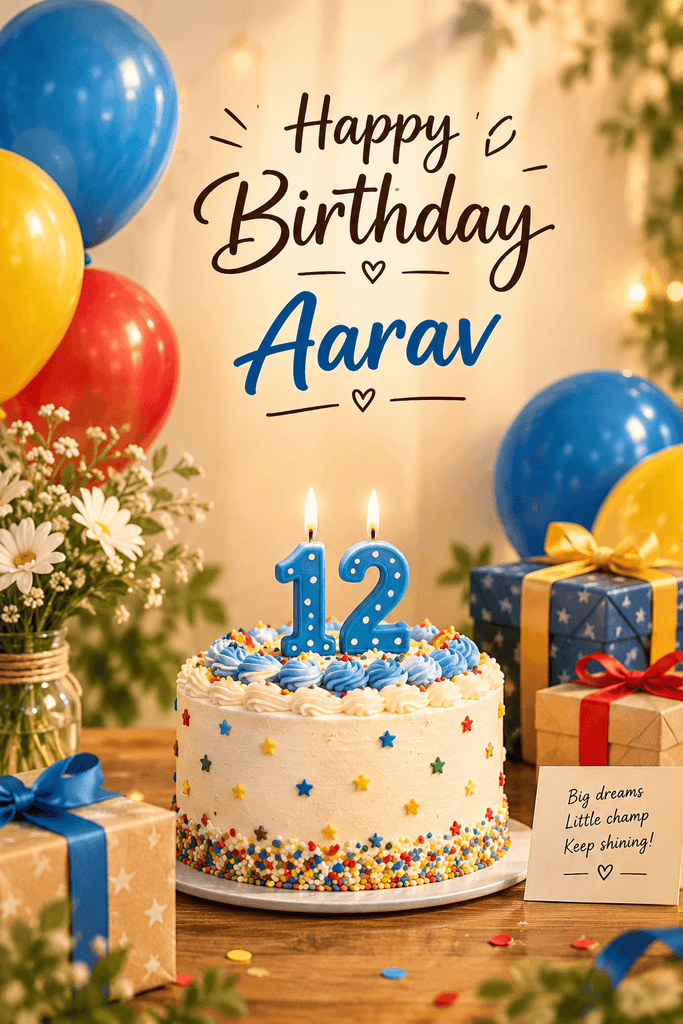
Create a birthday greeting image: a [COLOR] birthday cake with [AGE] candles on a table, balloons and gift boxes around it, soft warm light. Add the text "Happy Birthday [NAME]" at the top. Vertical format.कब इस्तेमाल करें: जब किसी की photo नहीं देनी या सिर्फ एक सादा wish image चाहिए।
नतीजा पसंद न आए तो क्या करें
उसी chat में नया निर्देश लिखें। नीचे कुछ आसान prompts हैं:
- चेहरा बदल गया हो:
Keep the face exactly the same as in my original photo. - Background बहुत भारी हो:
Make the background simpler and cleaner. - Text गलत आया हो:
The text must read exactly: "Happy Birthday [NAME]". Fix the spelling. - रोशनी कम हो:
Make the image brighter and the colors more vibrant. - Format बदलना हो:
Make this a vertical 9:16 image for Instagram story. - ज्यादा चीजें हों:
Remove the extra objects and keep only the cake and balloons.
आम गलतियाँ और उनके हल
| गलती | हल |
|---|---|
| नाम का spelling गलत आना | Prompt में लिखें: “The text must read exactly…” और नाम अंग्रेजी में साफ लिखें |
| चेहरा बदल जाना | Photo साफ और सामने से लें, और prompt में “keep the face unchanged” जरूर लिखें |
| बहुत सारी चीजें डालना | एक बार में 3-4 चीजें ही मांगें (cake, balloons, text) |
| धुंधली photo upload करना | अच्छी रोशनी वाली, साफ photo चुनें |
| Format गलत आना | Prompt में सीधे लिखें: “vertical 9:16” या “square 1:1” |
जरूरी सावधानियाँ
- सिर्फ अपनी या इजाज़त वाली photo upload करें। किसी दूसरे की photo बिना पूछे इस्तेमाल न करें।
- बच्चों की photo सिर्फ माता-पिता की मंजूरी से ही डालें।
- Privacy: Upload की गई photo के बारे में ChatGPT की privacy settings खुद देख लें। बहुत निजी या संवेदनशील photo न डालें।
- किसी को धोखा देने के लिए या किसी की गलत छवि दिखाने के लिए AI photo का इस्तेमाल न करें।
- Celebrity या नेता की photo पर ऐसे edits न करें।
क्या Gemini में भी यही prompts चलेंगे?
ज्यादातर prompts दूसरे AI tools (जैसे Gemini) में भी आज़माए जा सकते हैं, क्योंकि prompt लिखने का तरीका एक जैसा है। पर नतीजा अलग-अलग tool में अलग आ सकता है।
सिर्फ poster या banner बनाना हो तो यह post पढ़ें: Birthday Poster ke liye AI Prompts
अक्सर पूछे जाने वाले सवाल (FAQs)
क्या ChatGPT से birthday photo free में बन सकती है?
ChatGPT के free और paid plans में image बनाने की सुविधाएं और limits समय के साथ बदलती रहती हैं। इसलिए अपने account में देखें कि आपको क्या उपलब्ध है।
क्या मोबाइल से ChatGPT में birthday photo बनाई जा सकती है?
हाँ, ChatGPT के app या mobile browser से photo attach करके prompt डाला जा सकता है। Steps ऊपर दिए गए हैं।
ChatGPT में नाम हिंदी (देवनागरी) में लिखवा सकते हैं?
कई बार AI tools में देवनागरी text सही नहीं आता। इसलिए आसान तरीका यह है कि नाम Roman (English) अक्षरों में लिखें।
क्या चेहरा हूबहू आएगा?
यह हमेशा पक्का नहीं होता। Photo साफ रखें, और prompt में “keep the face unchanged” लिखें। फिर भी कई बार थोड़ा फर्क आ सकता है।
कौन सा prompt सबसे अच्छा है?
यह इस पर निर्भर करता है कि आपको क्या चाहिए। Natural नतीजे के लिए Prompt 1, social media के लिए Prompt 6 या 10, और बच्चों के लिए Prompt 3 या 9 आज़माएं।
ChatGPT के बिना भी birthday photo बन सकती है?
हाँ, और भी कई AI tools हैं जिनसे ऐसा किया जा सकता है। इस post में हमने ChatGPT पर ध्यान दिया है।
निष्कर्ष
ChatGPT से birthday photo बनाना आसान है: साफ photo चुनें, अच्छा prompt लिखें और नतीजे के हिसाब से छोटे सुधार मांगते जाएं। ऊपर के prompts से शुरुआत करें और अपने हिसाब से बदलाव करें। जो prompt आपके लिए अच्छा चला, उसे comment में जरूर बताएं।
आगे पढ़ें:
